
I used to manage WordPress updates and backups for all my clients from one central dashboard. It was fast and convenient, but it was slowing down my server and causing some client websites to load slowly or show errors. So I stopped using it. Today, I log in to every client website by hand, take a fresh backup, run the updates myself, and send each client a monthly report showing exactly what was done. It takes me longer, but my clients’ websites are faster, safer, and better looked after.
Here is the full story, including the client conversation that changed how I think about maintenance reports.
The Tool That Was Slowing Down My Clients’ Websites
For a long time, I used a remote management service to handle WordPress maintenance for my clients websites. It connected to every client site and let me update plugins, themes and WordPress core, run backups, and send reports, all from one screen.
On paper, it was a time saver. In practice, having an outside service constantly logging in to every site on my server put a real strain on it. Client websites started loading slowly, and some visitors were seeing 503 errors, which means the server was too busy to load the page.
For a small business, that is a serious problem. A slow or broken website loses phone calls, quote requests and trust. A maintenance tool should protect your website, not make it worse. So I removed it.
The Monthly Reports Disappeared Too
Removing that service fixed the speed problems, but it also switched off something I had not thought much about: the monthly maintenance report that was emailed to each client.
To be honest, I did not think my clients were reading those reports. They were automated emails, and nobody had ever mentioned them. I was still doing all the same work every month, so I assumed nothing had really changed from the client’s point of view.
I was wrong.
A Client Taught Me Why the Reports Matter
A long-time client, the owner of a local business here in Durham Region, asked me where his monthly reports had gone. I explained that I had stopped using the service because it was affecting the performance of my clients’ websites.
Two weeks later, he emailed me to cancel his maintenance plan. He said he would handle the updates and backups himself.
We talked it through on the phone. I explained that I am not comfortable hosting a website on my server that is not being maintained, because an out-of-date site is a security risk for him and for the other websites on that server. Partway through the conversation, he said, “Perhaps I was a little too hasty.”
I told him what I suspected: the decision was really about the missing reports. Without them, he could not see the work I was doing each month. From where he sat, it looked like he was paying for nothing.
So I made him a promise. If he stayed on the maintenance plan, I would find a better way to send him a monthly report. He agreed, and he resubscribed.
The lesson for me was simple. Doing the work is only half of the job. Showing the work is the other half. When clients cannot see what you are doing, they start to wonder if you are doing anything at all.
My New Maintenance Process: Hands-On, One Site at a Time
Instead of pushing one button to update every website at once, I now look after each client website individually. Every month, for every site, I:
- Log in to the client’s WordPress dashboard.
- Take a full backup of the website using WPvivid, so there is a fresh restore point before anything changes.
- Update any plugins, themes and WordPress core that need it.
- Record any extra work I did on the site so it shows up in the monthly report.
This takes more time than bulk updating, and that is the point. Because I am in each website when the updates happen, I can see right away if something does not look right. And because I took a backup a few minutes earlier, I can roll the site back quickly if an update ever causes a problem.
It also means there is no outside service logging in to every site on my server around the clock, so the server stays fast for everyone.
The New Monthly Report: Maintenance Report Plugin
To keep my promise, I went looking for a lightweight way to send monthly reports that would not strain my server. I found a free WordPress plugin called Maintenance Report, built by a developer named Potoki Paul.
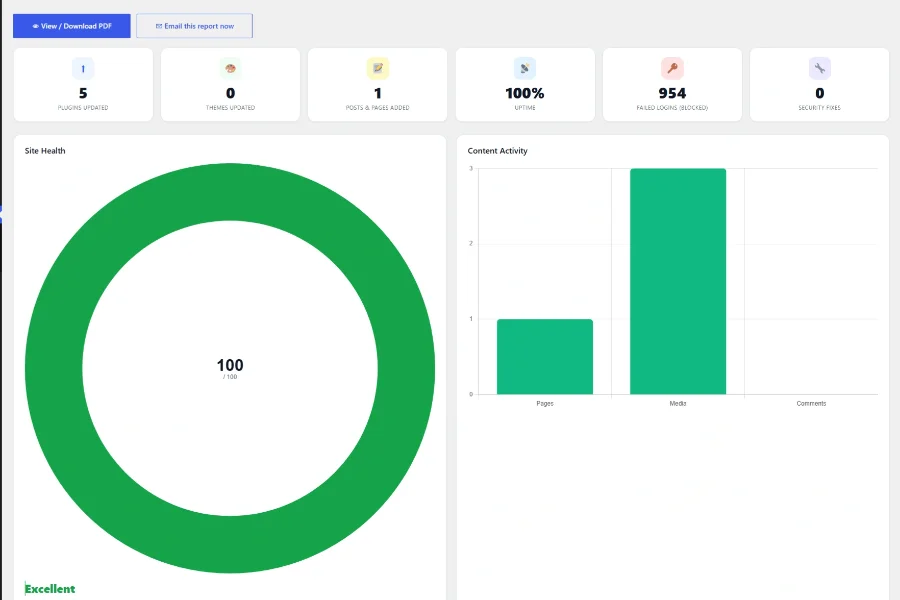
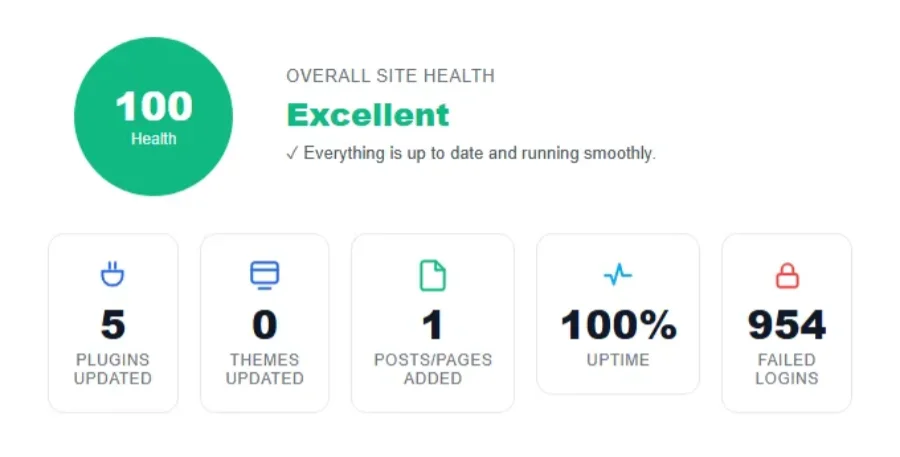
It runs quietly inside each website rather than connecting from the outside, and it sends a clean, easy-to-read report by email. Here is what my clients now see each month:
- Updates completed: every plugin, theme and WordPress core update, including the version numbers before and after.
- Website uptime: how much of the month the website was online and available to visitors.
- Failed login attempts: how many times someone tried and failed to log in to the website.
- Brute force attempts: automated attacks where bots try thousands of password guesses to break in.
- Manual entries: any extra work I did that month, such as content changes, fixes or improvements, so nothing goes unrecorded.
The security numbers often surprise people. Many small business owners do not realize their website is being tested by bots every single day. Seeing those attempts blocked, month after month, makes it clear why updates and security matter.
Why This Is Better for My Clients
Looking back, this change has been a win on every front:
- Faster websites: no heavy outside service putting a load on the server.
- More careful updates: a person checks every site, instead of one button updating everything blindly.
- A fresh backup every time: each round of updates starts with a new restore point.
- Proof of the work: clients get a monthly report in their inbox that shows exactly what was done.
- Peace of mind: clients can see that their website is online, up to date and protected from login attacks.
What This Means If You Are on My Maintenance Plan
If you are one of my maintenance clients, you will now receive a monthly email report from your own website. You do not need to log in or do anything. Just open the email and take a look at what was updated, how your website performed, and how many login attempts were blocked.
If you ever have a question about something in your report, send me an email or give me a call. I am always happy to explain it in plain English.
Frequently Asked Questions
What is included in a WordPress maintenance plan?
My WordPress maintenance plan includes a full website backup before every round of updates, updates to plugins, themes and WordPress core, security monitoring, and a monthly report emailed to you that shows the work completed, your website’s uptime, and blocked login attempts.
Why are WordPress updates important?
Out-of-date plugins and themes are one of the most common ways websites get hacked. Updates fix security holes, keep features working, and help your website stay compatible with new versions of WordPress.
Can I update my own WordPress website?
Yes, you should update your WordPress Website weekly. Before updating, you should always make a full backup of your site. Most small business owners would rather spend that time running their business, which is why a maintenance plan makes sense for them.
Why do I need a monthly website maintenance report?
A monthly report shows you exactly what was done on your website, so you are not left wondering what you are paying for. It also gives you a clear picture of your website’s health, including uptime and security activity.
Do you offer WordPress maintenance in Durham Region?
Yes. I provide WordPress maintenance for small businesses in Oshawa, Whitby, Ajax, Pickering, Clarington and across Durham Region, as well as clients across Canada.
Need Someone to Look After Your WordPress Website?
If you run a small business in Durham Region and want your WordPress website backed up, updated and protected by a real person, with a monthly report that shows the work, I would be happy to help. Contact me to talk about a maintenance plan that fits your business.

Larry is a local web designer located in Oshawa, Ontario. He specializes in building WordPress websites for service-based businesses in Durham Region, and is committed to helping his clients outrank their competition.