Quick Answer
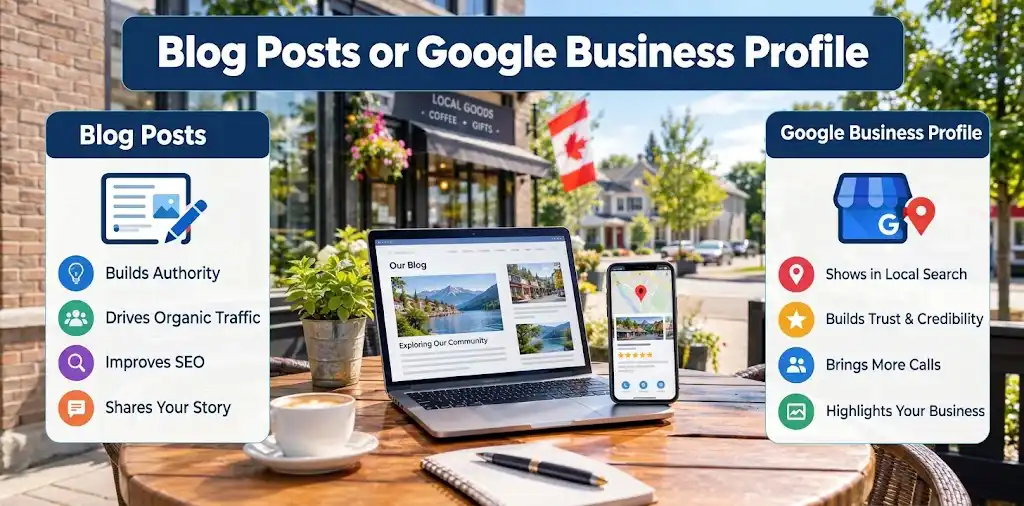
Most local service businesses should do both, but they solve different problems.
- Google Business Profile posts give you fast, short-term visibility right where people are already searching for you on Maps and in local search results.
- Blog posts build long-term authority and answer the deeper questions that turn a curious visitor into a paying customer.
If you only have time for one this week, post to your Google Business Profile. If you’re planning your next quarter, write the blog post.
Key Takeaways
Google Business Profile Posts are short, photo-led updates that show up on your Business Profile in Maps and Search.
They are not a direct ranking factor, but Google has confirmed they influence visibility through engagement and popularity signals (Google Business Profile Updates 2026).
Posting at least once a week is the current, widely recommended cadence for local businesses.
Blog posts drive long-term search discovery; Google Business Profile Posts drive short-term clicks, calls, and direction requests.
Posts are free to create and publish, with no cost to use the feature itself.
Fresh Business Profile activity can help your blog content get noticed and crawled faster, especially after Google’s March 2026 core update, which rewards content freshness.
Thin, low-effort posts and shallow blogs are both being outperformed by richer, more useful content in 2026.
The smartest approach for a small service business is a simple weekly rhythm: one Business Profile post every week, one blog post every month.
What Is a Google Business Profile Post?
A Google Business Profile Post is a short update you publish directly to your free Google Business Profile, and it appears on your listing in Google Maps and local search results. Think of it as a mini announcement, like a tiny billboard sitting right next to your business name when someone searches for you.
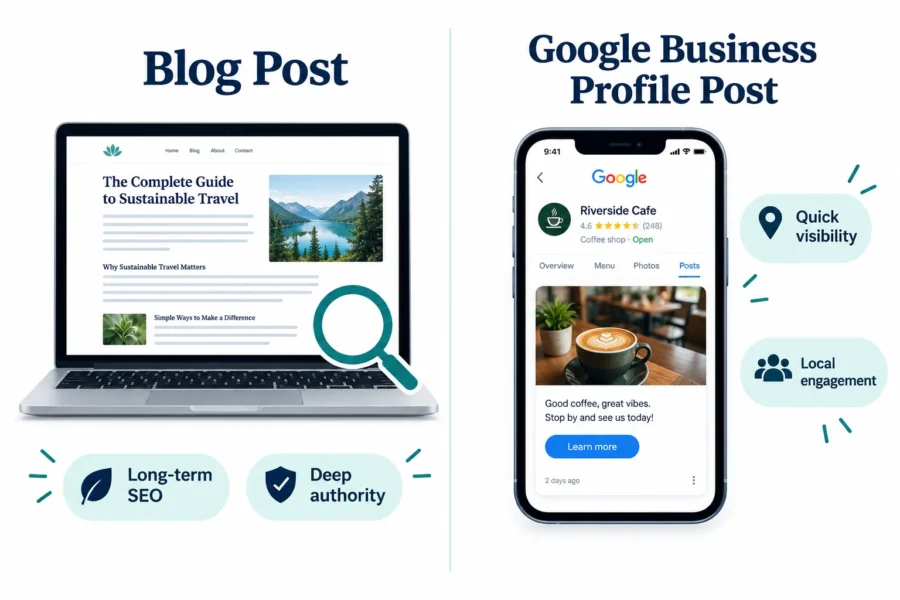
Posts typically include a photo or short video, a headline, a short description, and sometimes a button (like “Call now” or “Learn more”). This is different from what used to be called Google My Business Posts. The feature itself hasn’t changed in purpose, it just got renamed when Google rebranded Google My Business into Google Business Profile a few years back. Same tool, same idea, just a new name.
For a plumber in Whitby or a landscaper in Oshawa, this is one of the simplest, most direct ways to tell nearby customers “we’re open, we’re active, here’s what we’re doing this week.”
Google Business Profile Posts vs Blog Posts: Which Is Better?
Neither one beats the other outright, because they’re built for different jobs. Google Business Profile Posts win on speed and local visibility, while blog posts win on depth, search discovery, and long-term authority (contractor marketing comparison).
Here’s how I explain it to clients:
| Factor | GBP Posts | Blog Posts |
|---|---|---|
| Where it shows up | Maps, local search, your listing | Your website, Google search results |
| Lifespan | Short-term, fresh content needed weekly | Long-term, can rank for years |
| Effort to create | Low, five to ten minutes | Higher, needs research and structure |
| Best for | Promotions, updates, events | How-to guides, FAQs, service explainers |
| SEO impact | Indirect, through engagement signals | Direct, through keyword relevance and freshness |
| Cost | Indirect, through engagement signals | Free (if you already have a site) |
Decision rule: choose Google Business Profile Posts if you need to tell people something happening this week (a sale, a new hire, a holiday closure). Choose a blog post if you’re answering a question customers ask over and over, like “how much does furnace repair cost in Durham Region” or “what should I look for in a roofing contractor.” I build both into every WordPress Maintenance plan I offer, because a service business genuinely needs both working together.
Do Google Business Profile Posts Help With SEO?
Google Business Profile Posts are not a confirmed direct ranking factor, but they do influence your visibility indirectly through engagement and freshness signals. Google has been explicit about this positioning: posts are engagement and conversion tools first, not a shortcut to the top of the map pack (Google’s latest updates documentation).
Here’s the practical part that matters more than the technical debate. When you post regularly:
Your profile shows activity, which can nudge your click-through and engagement numbers up.
Active profiles tend to get crawled and refreshed more often.
Consistent posting can help your linked blog content get discovered faster, especially since Google’s March 2026 core update puts real weight on content freshness.
If you’re doing local SEO seriously, Google Business Profile Posts are one input in a bigger system that includes reviews, photos, categories, and your website itself. They’re not the whole strategy, but skipping them leaves visibility on the table.
How to Create a Google Business Profile Post (Step by Step)
Creating a Google Business Profile Post takes about five to ten minutes once you know where to click, and you don’t need any technical skill to do it. Here’s the process:
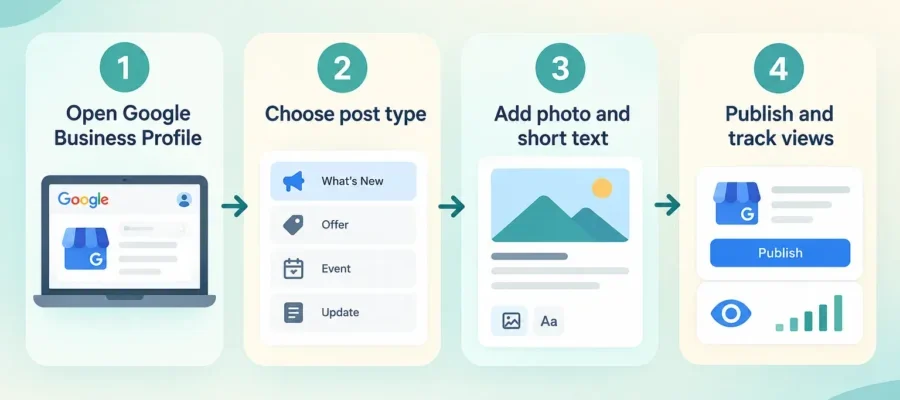
Log into your Google Business Profile through Google Search or Maps, using the account tied to your business.
Select “Add update” or “Posts” from your profile dashboard.
Choose your post type: What’s New, Offer, Event, or Product, depending on what you’re announcing.
Add a photo or short video, since posts with images perform far better than text-only ones.
Write a short, clear description, staying within the character limit.
Add a button if relevant, like “Call now,” “Book,” or “Learn more.”
Publish and check your performance metrics after a few days.
New features rolling out through 2025 and 2026 have made this faster for businesses with multiple locations, allowing bulk publishing across profiles from one dashboard (Google Business Profile updates for 2026). If you run more than one location in the Durham Region, that update alone is worth checking out.
Google Business Profile Posts character limit: Google gives you up to 1,500 characters for the post description, but only the first 100 or so characters show before customers need to tap “more.” Write your key message in the first sentence.
Can you schedule Google Business Profile Posts? Yes, through Google’s own interface or through third-party local SEO tools, you can schedule posts in advance rather than publishing manually every week. This is one of the easiest ways to stay consistent without thinking about it daily.
What Should You Post on Google Business Profile? Best Practices
The best Google Business Profile Posts are short, visual, and tied to something real happening in your business right now. Vague, generic updates (“We love our customers!”) don’t get engagement and don’t help you at all.
Post ideas that actually work for a service business:
A finished project photo with a one-line description of the work done.
A seasonal reminder, like furnace tune-ups before winter or eavestrough cleaning before fall.
A limited-time offer or discount code.
A team update, like a new hire or a truck getting wrapped with your logo.
A quick answer to a common customer question, with a link to the full blog post for details.
Best practices that separate strong profiles from weak ones:
Post at least once a week, since Google and most local SEO practitioners now agree that weekly is the baseline for staying visible (Google Business Profile stats and benchmarks).
Always use a real, high-quality photo. Stock photos read as fake and get ignored.
Keep your first sentence strong, since that’s all most people see before tapping away.
Link back to a relevant blog post or service page when you have one, so the click has somewhere useful to land.
Common mistake: posting once and forgetting about your profile for three months. An inactive profile looks abandoned, and customers notice.
Why Are My Google Business Profile Posts Not Showing Up?
If your Google Business Profile Posts aren’t showing up, the most common causes are a pending profile verification, a policy violation, a caching delay, or the post simply expiring off the front-facing carousel. Posts don’t always disappear from your account, they just stop being featured prominently after their display window closes.
Quick troubleshooting checklist:
Check whether your profile is fully verified, since unverified profiles have limited posting visibility.
Review the post for banned content, like phone numbers stuffed into the description or misleading claims.
Give it 24 to 48 hours, since display can lag behind publishing.
Confirm you’re checking the right account if you manage multiple listings.
If none of that fixes it, Google’s official support documentation on posts is the most reliable next step (Google’s guide to creating posts).
Do Customers See Google Business Profile Posts, and How Long Do They Last?
Yes, customers see Google Business Profile Posts directly on your listing when they search for your business or browse nearby options on Maps, and Google has been surfacing them in additional places recently, including carousels and AI-powered search summaries. Standard posts (What’s New) typically display prominently for about seven days before rotating out of the main view, while Event and Offer posts can stay visible through their listed end date (Google’s post format guidance).
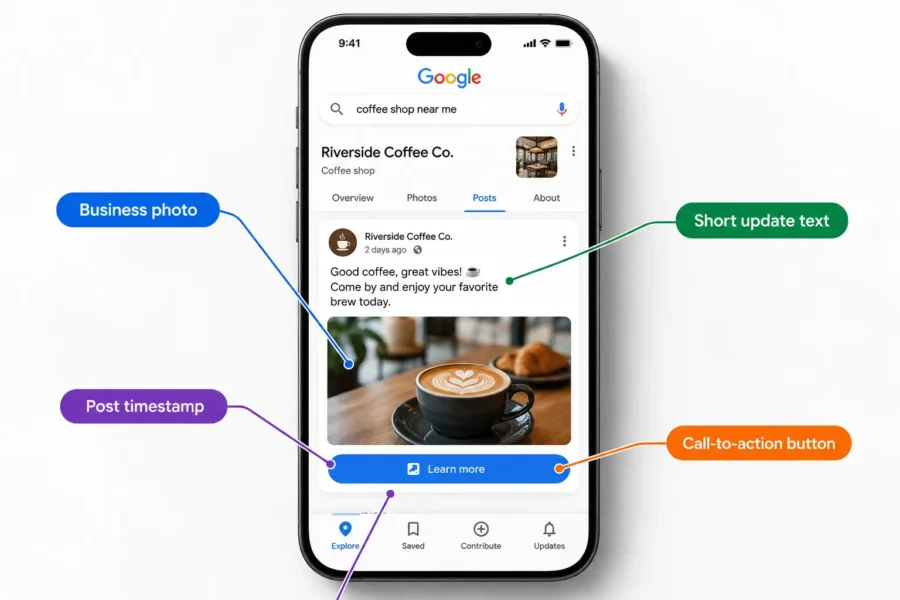
This is the biggest practical difference from a blog post. A blog post can rank and drive traffic for years. A Google Business Profile Post gets its best exposure in a tight window, then fades, even though the post technically stays in your history. That’s exactly why a weekly cadence matters so much, it keeps something fresh always in that visible window.
“A stale Google Business Profile signals a stale business, even if you’re actually busier than ever.”
Is Google Business Profile Posts Free?
Yes, creating and publishing Google Business Profile Posts is completely free, and it always has been. There’s no premium tier for posting itself. Google makes money elsewhere (ads, business services), not by charging you to post updates on your free listing.
The only cost involved is your time, or the time of whoever manages your local online presence for you. That’s the real trade-off small business owners face: not dollars, but consistency.
The Simple Weekly Rhythm I Recommend
I’m not a fan of overcomplicating this. Here’s the rhythm I set up for service business clients across the Durham Region:
One Google Business Profile Post per week, tied to something real (a job, an offer, a seasonal reminder).
One blog post per month, answering a real customer question in depth.
Link the two together whenever it makes sense, so your quick post feeds traffic into your deeper content.
This isn’t flashy, and it doesn’t need to be. It’s consistent, it’s affordable, and it works better than either tactic alone.
Frequently Asked Questions
It’s a short update, usually with a photo, that appears directly on your free Google Business Profile listing in Maps and Search, letting nearby customers see your latest news or offers.
At least once a week is the current baseline recommendation, since consistent activity keeps your listing looking active and fresh in front-facing views.
Yes. Google My Business was renamed to Google Business Profile, but the posting feature itself works the same way it always did.
Not directly. Google has said posts aren’t a confirmed ranking factor, but they can improve engagement signals that indirectly support visibility.
Standard posts usually show prominently for about seven days before rotating out, while Event and Offer posts can stay visible through their end date.
Yes, through Google’s own tools or third-party local SEO platforms, letting you batch-create posts instead of logging in every single week.
Yes, up to 1,500 characters, though only around the first 100 characters show before a customer has to tap to read more.
Both, ideally. Blog posts build long-term search authority, while Google Business Profile Posts deliver fast, local, short-term visibility. Together they cover more ground than either alone.
Should a small service business do blog posts or Google Business Profile Posts?
Both, ideally. Blog posts build long-term search authority, while Google Business Profile Posts deliver fast, local, short-term visibility. Together they cover more ground than either alone.
Data Snapshot: Weekly Posting and Profile Engagement
Illustrative Impact of Weekly Google Business Profile Posting
Estimated relative increase in profile actions (calls, direction requests, website clicks) for profiles that post weekly versus profiles that rarely post.
Illustrative data based on industry benchmarks. Data source: Google Business Profile Stats
Conclusion
Google Business Profile Posts and blog posts aren’t competitors, they’re teammates. One gets you seen this week. The other gets you found for years. If you’re a local service business trying to convert locally without wasting money on tactics that don’t fit how customers actually search, the winning move is simple: post to your Business Profile weekly, and write one solid blog post a month that answers a real customer question.
I build affordable WordPress websites and handle local SEO and WordPress Maintenance for service businesses across the Durham Region and Oshawa, and this exact rhythm is baked into how I set up client sites. No technical jargon, no guesswork, just a steady local online presence that keeps working while you run your business. If you want help setting this up properly, reach out and I’ll walk you through it in plain English.

Larry is a local web designer located in Oshawa, Ontario. He specializes in building WordPress websites for service-based businesses in Durham Region, and is committed to helping his clients outrank their competition.