Last updated: September 22, 2026
Quick Answer
AODA website compliance in Ontario means meeting WCAG 2.0 Level AA standards (minus two specific criteria) under the Accessibility for Ontarians with Disabilities Act. Public sector bodies and private or non-profit organizations with 50 or more employees must already meet this standard, and businesses with 20+ employees must file an accessibility compliance report by December 31, 2026. Skipping this isn’t just a legal risk. It’s leaving customers with disabilities locked out of your website.
Key Takeaways
- AODA compliance for websites requires WCAG 2.0 Level AA conformance, with a few exceptions, under Ontario’s Information and Communications Standard (aodaprep.ca).
- Organizations with 50+ employees, plus all public sector bodies, must have accessible websites; this obligation has applied since January 1, 2021 (wcagrules.com).
- The next AODA compliance report deadline for private businesses and non-profits with 20+ employees is December 31, 2026 (cantangroup.com).
- Public sector organizations report every two years; private and non-profit organizations report every three years (cantangroup.com).
- Even a small local service business benefits from accessible design because it improves usability, SEO, and how well a site can convert local visitors into leads.
- Accessibility statements, staff training, and documented audits all matter if your organization is ever reviewed.
- Fixing accessibility issues on an old WordPress site is often cheaper and less disruptive than most business owners expect.
What Is AODA Compliance and Why Does It Matter for Websites in Ontario
AODA compliance means following the Accessibility for Ontarians with Disabilities Act, a provincial law requiring organizations to remove barriers for people with disabilities, including on their websites. It matters because roughly 2.9 million Ontarians live with some form of disability, and an inaccessible website simply shuts them out of your business.
The Ontarians with Disabilities Act framework predates AODA, but AODA (passed in 2005) is the law with real teeth: standards, deadlines, and compliance reporting. Its Information and Communications Standard is the piece that covers digital content, including public-facing websites, PDFs, and web applications (accessibilitychecker.org). If you run a service business in Durham Region, this standard likely applies to your site the moment your business or non-profit reaches the size thresholds set out below.
I’ve built affordable WordPress websites for small businesses across Oshawa and the wider Durham Region for years, and accessibility used to be an afterthought for most of my clients. That’s changing. AODA compliance is now something local business owners ask about directly, not something I have to bring up first.
AODA Website Accessibility Requirements in Ontario for 2026
The core AODA website accessibility requirement in Ontario for 2026 is still WCAG 2.0 Level AA, excluding two live-captioning and audio-description criteria, applying to public web content published since January 1, 2012 (aodaprep.ca). This obligation is not new for 2026, but enforcement and reporting scrutiny around it are increasing this year.
Rules differ slightly depending on what type of organization you run.
Rules for Businesses and Non-Profits
- Organizations with 1 or more employees must generally follow AODA accessibility standards.
- Organizations with 20 or more employees must file an accessibility compliance report.
- Organizations with 50 or more employees must make their public websites conform to WCAG 2.0 Level AA (levelaccess.com).
Rules for Public Sector Organizations
Every public sector organization in Ontario, regardless of employee count, must meet the WCAG 2.0 Level AA standard and file a compliance report every two years, with the next deadline set for December 31, 2025 (cantangroup.com). This is separate from the three-year reporting cycle that applies to private businesses and non-profits.
Legal and advisory commentary now treats WCAG 2.0 AA as a floor, not a ceiling. Many auditors expect organizations to progress toward WCAG 2.1 and 2.2 on new builds or major redesigns, even though the AODA regulation hasn’t formally been updated yet (accessibilitychecker.org).
AODA vs WCAG: Which Standard Applies to Your Ontario Website
AODA is the Ontario law; WCAG (Web Content Accessibility Guidelines) is the technical standard the law adopts. AODA’s Information and Communications Standard legally requires WCAG 2.0 Level AA conformance, so when people ask “which standard applies,” the honest answer is: both, because AODA borrows WCAG as its measuring stick (wcagrules.com).
AODAWCAGWhat it isOntario lawGlobal technical guidelineEnforced byOntario governmentNot legally enforced on its ownVersion referencedWCAG 2.0 Level AA2.0, 2.1, 2.2 (evolving)Applies toOntario organizations by sizeAny website worldwide
Some vendors now describe WCAG 2.2 Level AA as the “current recommended standard” for Ontario organizations, even though it’s not yet codified into AODA regulation (accessibilitychecker.org). Choose WCAG 2.0 AA if you only need the legal minimum. Choose WCAG 2.1 or 2.2 if you’re rebuilding your site anyway and want it future-proofed. This also connects to the ADA (Americans with Disabilities Act) in the U.S., which uses similar guidelines but isn’t the law that governs Ontario websites.
How Do I Check If My Website Is AODA Compliant
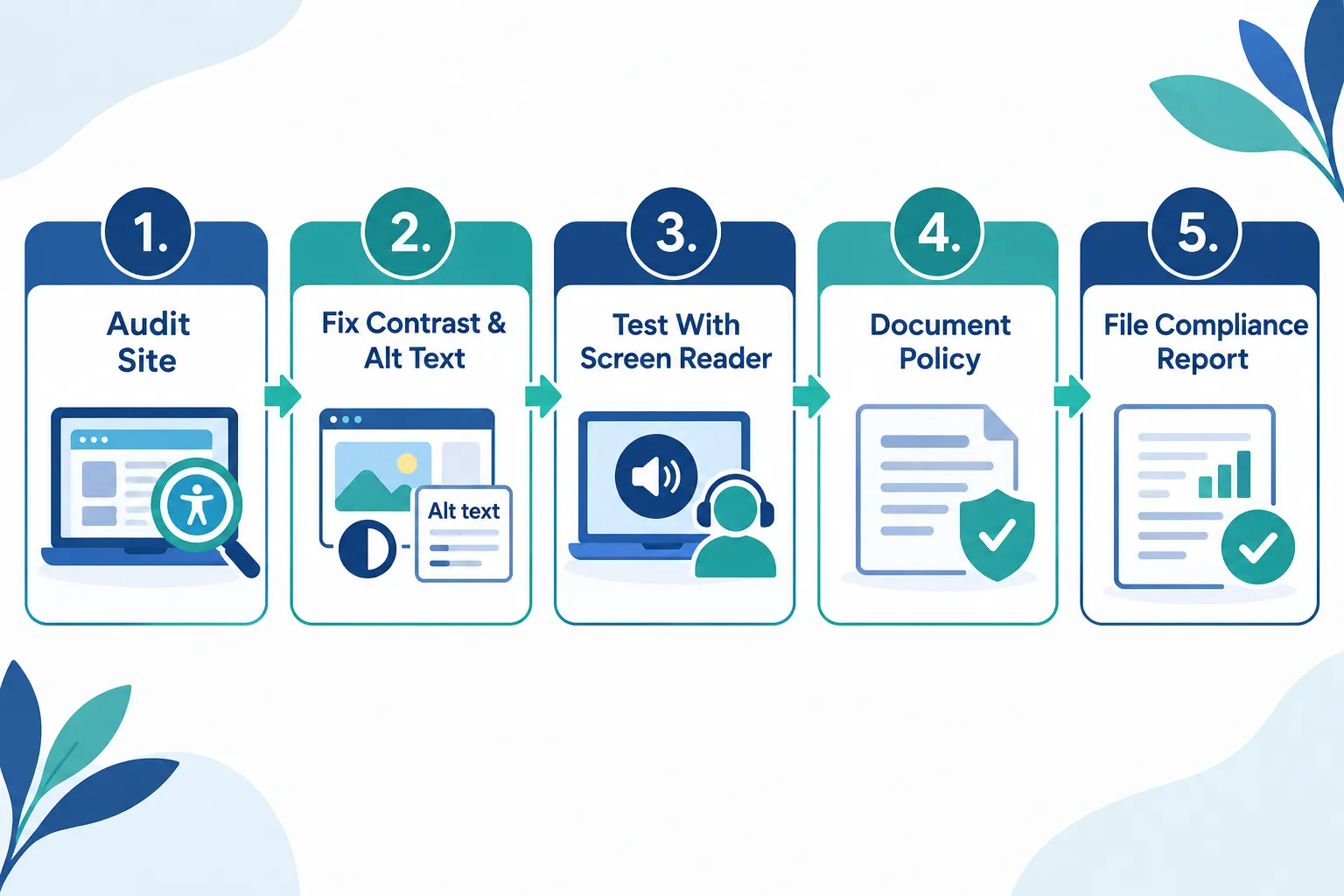
You check AODA compliance by running your site through an accessibility scanner, then manually testing keyboard navigation, screen reader behaviour, and colour contrast, since automated tools alone miss real barriers. A full accessibility audit typically combines both automated and manual review.
Practical steps:
- Run a free automated scan against WCAG 2.0 AA success criteria.
- Tab through every page using only your keyboard. If you can’t reach a button or menu, that’s a barrier.
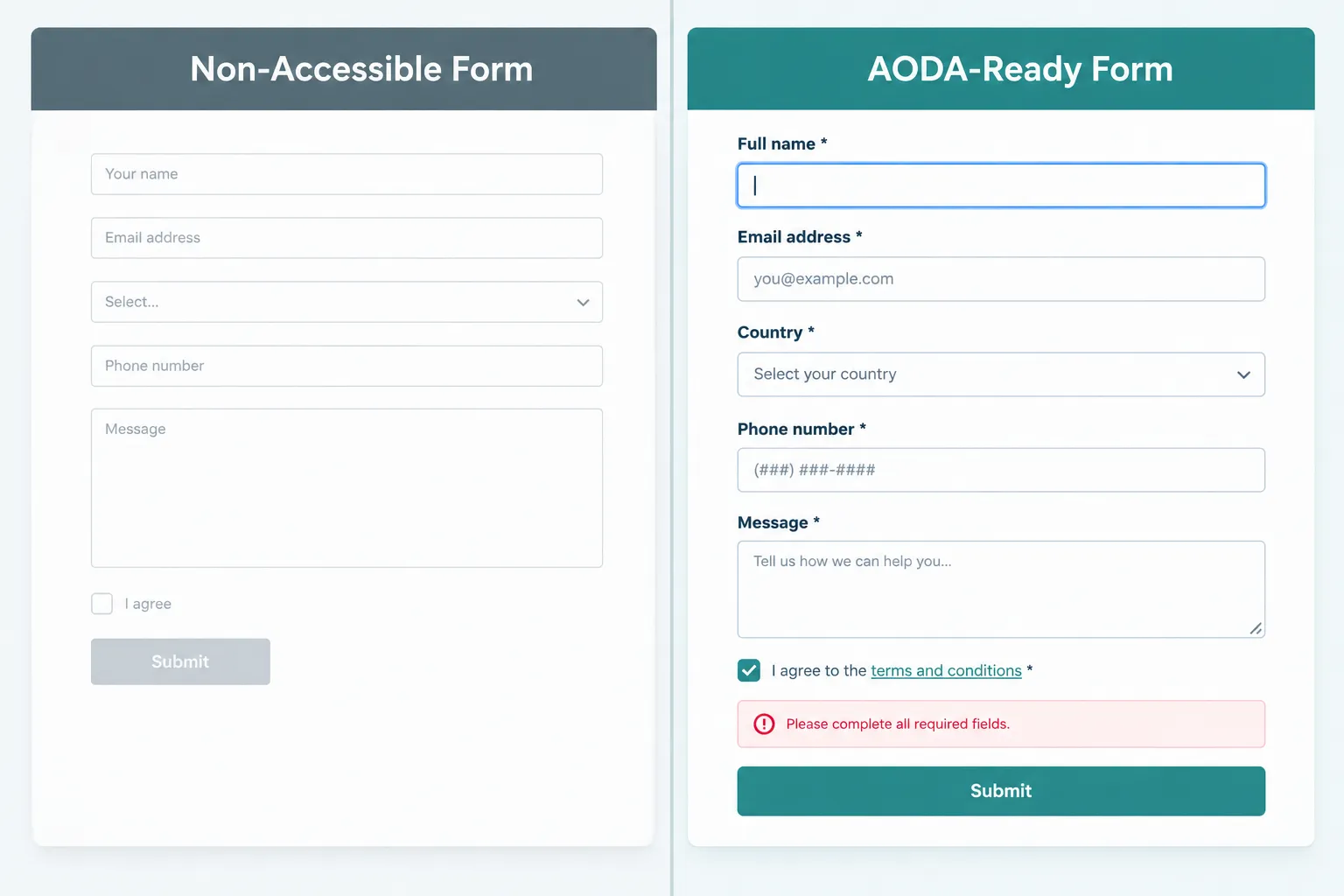
- Test forms with a screen reader to confirm labels and error messages are announced clearly.
- Check colour contrast on buttons, links, and body content.
- Review PDFs and downloadable documents; these often fail even when the main site passes.
If you don’t have the technical background to do this yourself, that’s fine. It’s exactly the kind of thing I handle for clients as part of ongoing WordPress Maintenance, so accessibility fixes don’t fall through the cracks between redesigns.
What Accessibility Features Do I Need on My Website for AODA
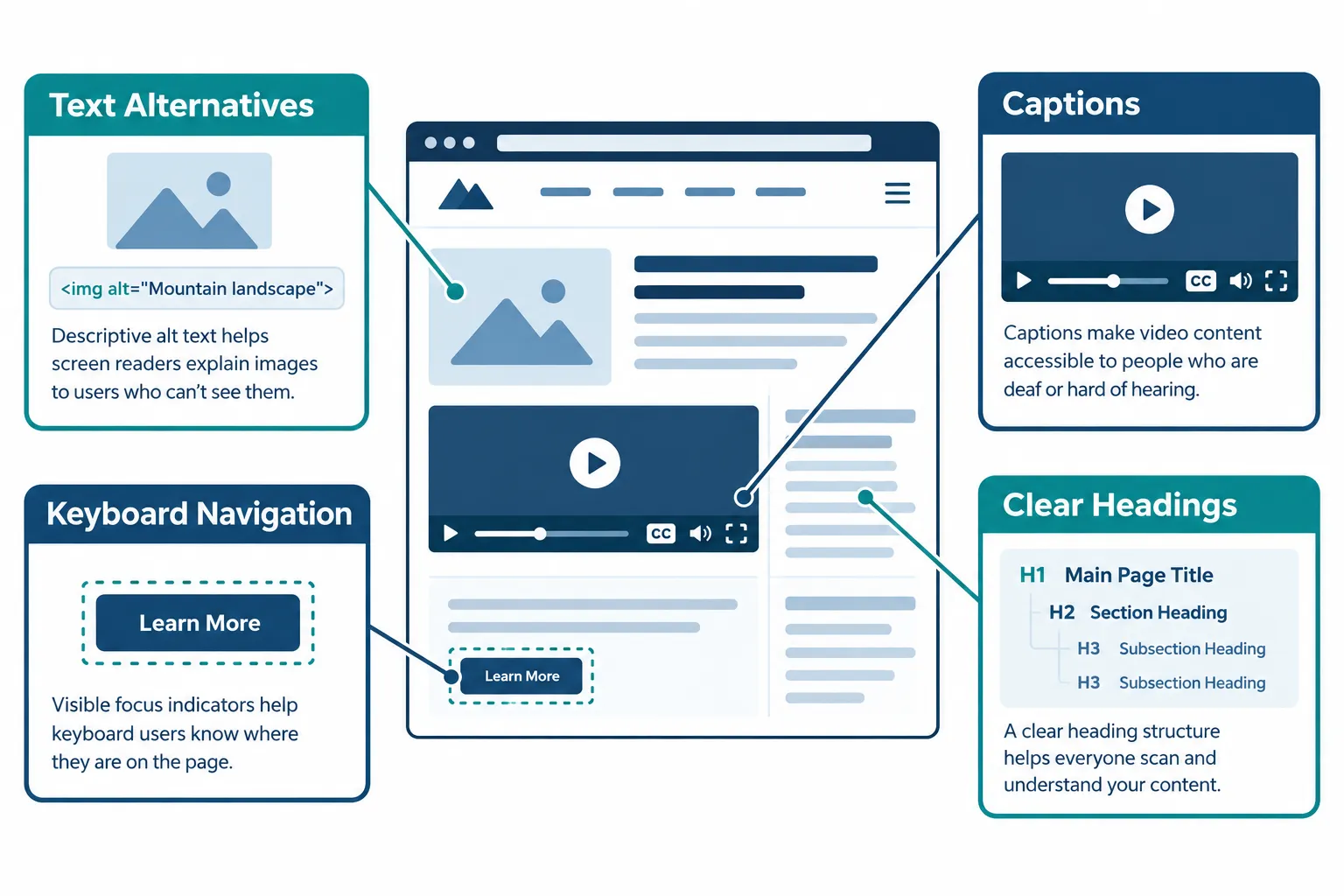
At minimum, your website needs text alternatives for images, captions or transcripts for video, full keyboard operability, a logical heading structure, and accessible forms with clear labels and error messages (accessibe.com).
Common technical must-haves:
- Alt text on every meaningful image (not decorative ones)
- A visible “skip main content” link for screen reader and keyboard users
- Sufficient colour contrast between text and background
- No content that flashes fast enough to trigger seizures
- Clear focus indicators so keyboard users can see where they are on the page
One thing I check constantly on client sites: stray HTML artifacts left over from copy-pasting content out of Word or PDFs. A raw ’ where an apostrophe should be, or extra codes stacked between words, can confuse screen readers even when the visible page looks fine. I’ve cleaned up sites where every product description had a hidden before every price, and another where ’ showed up dozens of times in headings pasted from a legal document. These small ’ and glitches are invisible to most visitors but very visible to assistive technology, so cleaning them up is part of real AODA website compliance work, not just cosmetic tidying.
AODA Website Compliance Penalties and Fines in Ontario
AODA penalties in Ontario can reach into the hundreds of thousands of dollars for organizations found non-compliant, though enforcement historically has focused more on directives and audits than maximum fines. The bigger risk for most small and mid-sized businesses is reputational damage and legal exposure if an accessibility complaint becomes public.
Accessibility consultancies are warning that the 2026 reporting cycle will bring more scrutiny. Organizations that certify compliance without real evidence, meaning no audit, no documented remediation, and no training records, may face legal risk if an investigation later finds their public website doesn’t actually meet the WCAG 2.0 AA requirement (accessibe.com). Filing a compliance report that says “yes, our website complies” when it doesn’t is worse than not filing at all.
How Much Does AODA Compliance Cost for Ontario Businesses
AODA compliance cost varies widely, but for a small service business website it’s usually a fraction of a full rebuild, especially if accessibility gets addressed early rather than bolted on later. A basic audit plus targeted fixes on a WordPress site is far cheaper than a lawsuit or a failed compliance report.
Rough cost drivers:
- Size of the website (a five-page brochure site vs. a large e-commerce catalog)
- Whether you’re fixing an existing site or building new
- Whether PDFs, videos, or complex forms need remediation
- Whether ongoing monitoring and training are included
If you’ve ever gotten a quote from a big agency and felt sticker shock, you’re not alone. I wrote a full breakdown on what cheap website design actually costs you, and accessibility work follows the same pattern: doing it properly the first time is almost always cheaper than patching a broken, non-compliant site twice.
Small Business Website AODA Requirements in Ontario
Small businesses under 50 employees aren’t automatically required to meet WCAG 2.0 AA under AODA, but businesses with 20 or more employees still must file compliance reports, and every organization with even one employee has general AODA obligations around customer service and communication (levelaccess.com).
Do I need AODA compliance if I have a small website? Legally, maybe not yet, if you’re under the employee thresholds. Practically, yes, because:
- Accessible sites tend to rank better and load cleaner, which helps local SEO
- Screen reader-friendly structure often overlaps with good UX that helps convert locally
- You avoid a scramble later if your business grows past 20 or 50 employees
I build every site, including for solo service businesses and small law firms, with basic accessibility baked in from day one. It costs almost nothing extra when it’s part of the original build, unlike retrofitting it later. If you’re weighing website investment against marketing spend, my comparison on law firm website design versus local SEO covers that trade-off in more depth.
Common AODA Compliance Mistakes Businesses Make
The most common AODA compliance mistake is treating accessibility as a one-time checklist instead of an ongoing practice, which means new content added after launch quietly breaks compliance. Another frequent mistake is assuming a nice-looking site is automatically an accessible one.
Other mistakes I see constantly:
- Publishing PDFs that were never checked for screen reader compatibility
- Using colour alone to indicate form errors, with no text label
- Forgetting alt text on new blog images months after launch
- Leaving stray
and’codes in content pasted from other documents - Assuming a website builder or theme is “automatically compliant” out of the box
That last one trips up more business owners than anything else. If you’re weighing a DIY builder against a properly built accessible site, my breakdown of AI website builders’ pros and cons for small business is worth a read before you commit.
AODA Website Compliance Timeline: When Do You Need to Be Compliant
The AODA website compliance timeline already passed its biggest legal deadline: January 1, 2021, when WCAG 2.0 AA became mandatory for public sector bodies and organizations with 50+ employees (wcagrules.com). The next major date on the calendar is December 31, 2026, the compliance report deadline for private businesses and non-profits with 20+ employees.
.cg-wrap{font-family:Arial,Helvetica,sans-serif;max-width:640px;margin:0 auto;padding:16px;background:#f7fafa;border-radius:10px} .cg-title{font-size:16px;font-weight:bold;color:#123047;margin-bottom:4px} .cg-cap{font-size:13px;color:#33586b;margin-bottom:14px} .cg-bar-row{display:flex;align-items:center;margin-bottom:10px} .cg-label{width:190px;font-size:12px;color:#123047} .cg-track{flex:1;background:#dfeaec;border-radius:6px;height:20px;overflow:hidden} .cg-fill{height:100%;background:#1a7f8c;border-radius:6px 0 0 6px} .cg-val{width:60px;text-align:right;font-size:12px;color:#123047;font-weight:bold} .cg-src{font-size:11px;color:#5a7482;margin-top:10px} .cg-src a{color:#1a7f8c}Practically, if you’re planning a redesign in 2026, build in accessibility from the start and be ready to demonstrate WCAG 2.0 AA conformance within roughly 90 days of launch, since that’s the window many auditors expect for evidence during a compliance review (fireantstudio.com).
AODA Compliance Tools and Software for Ontario Businesses
Several accessibility scanning tools can flag common WCAG 2.0 AA issues automatically, but no tool fully replaces a human review, especially for keyboard and screen reader testing. Combining a scanning tool with a manual pass gives the most reliable picture of where your site stands.
Useful resources for Ontario businesses:
- Ontario’s official AccessForward training modules for employees and managers
- The Ontario government’s accessibility compliance reporting portal for filing your report
- Automated scanners for quick WCAG 2.0 AA checks
- A WordPress maintenance provider who checks accessibility as part of routine updates, not just at launch
Speaking of maintenance: accessibility isn’t a “set it and forget it” job. New blog posts, new images, new forms, they all need the same checks the original site got. I cover why ongoing upkeep matters in how often you should update your WordPress website, and accessibility drift is one of the biggest reasons regular maintenance pays for itself.
Who Is Responsible for AODA Website Compliance: Owner or Developer
The business owner is ultimately responsible for AODA website compliance, even if a developer or agency built and manages the site, because compliance reports must be certified by a senior officer of the organization (cantangroup.com). Outsourcing the build does not outsource the legal responsibility.
That said, a competent web partner should be doing the heavy lifting:
- Building accessible structure and code from day one
- Flagging accessibility issues during regular maintenance
- Documenting what’s been fixed and when
- Explaining, in plain language and no technical jargon, what still needs attention
This is exactly how I work with local clients across the Durham Region. You run your service business. I handle the accessibility, security, and technical upkeep so you’re not left guessing whether your local online presence is compliant or just decent-looking.
What Should an AODA Accessibility Statement Include
An AODA accessibility statement should name the standard you’re following (WCAG 2.0 Level AA), describe how visitors can request accommodations or report barriers, and give a contact method for accessibility feedback. It should be easy to find, usually linked in your website footer.
A solid statement typically includes:
- A plain-language commitment to accessibility
- The standard referenced (WCAG 2.0 AA, per AODA)
- Contact information for accessibility complaints or accommodation requests
- A note on alternate formats available on request (large print, audio, etc.)
- The date it was last reviewed
This single page won’t make your site compliant on its own, but it shows good faith and gives customers, and auditors, a clear signal that accessibility is taken seriously.
Frequently Asked Questions
What are the AODA compliance requirements for websites?
Websites covered by AODA’s Information and Communications Standard must meet WCAG 2.0 Level AA, minus two live-media criteria, if the organization is a public sector body or has 50+ employees. This has applied since January 1, 2021, covering pages, forms, PDFs, and web apps published after January 1, 2012.
Do Canadian websites have to be ADA compliant?
No. ADA is a U.S. law and doesn’t legally apply to Canadian websites. Ontario businesses must follow AODA, which references WCAG 2.0 Level AA. The two laws use similar accessibility guidelines, but AODA is the one that carries legal weight and reporting requirements in Ontario.
Is AODA mandatory in Ontario?
Yes. AODA is mandatory for all Ontario organizations with one or more employees, with obligations scaling by size: general standards apply broadly, compliance reporting applies at 20+ employees, and full WCAG 2.0 AA website compliance applies at 50+ employees and to all public sector bodies.
What are the requirements for web accessibility in Canada?
There’s no single federal web accessibility law covering all of Canada; requirements vary by province and sector. In Ontario, AODA sets the binding requirement at WCAG 2.0 Level AA. Federally regulated organizations may also fall under the Accessible Canada Act, which references similar accessibility guidelines.
Conclusion
AODA website compliance in Ontario isn’t going away, and the December 31, 2026 reporting deadline is close enough that “later” isn’t really an option anymore. Whether you’re a 15-person law firm or a five-person local service business, accessibility affects how many customers can actually use your site, not just whether you pass an audit.
Here’s my honest take, after years of building affordable WordPress websites for small businesses in Durham Region: the businesses that treat accessibility as part of normal website upkeep, not a scramble before a deadline, end up ahead. It costs less, it reads cleaner to Google, and it helps convert locally because more people can actually use the site.
If you’re not sure where your site stands, start simple: check your headings, check your forms, check your images for alt text, and clean up any stray or ’ clutter in your content. Then get a real audit before December 2026 sneaks up on you. And if you’d rather have someone who explains all this in plain English, with no technical jargon and no scary agency quote, that’s the kind of straightforward help I provide.
Check out what actually makes a website design convert customers, or just have a look at the full range of website design and development services I offer to local businesses across the region.
References
[1] Aoda Website Compliance – https://aodaprep.ca/guides/aoda-website-compliance/
[2] Aoda Compliance Checklist – https://accessibe.com/blog/aoda-compliance-checklist
[3] Aoda – https://wcagrules.com/laws/aoda
[4] Aoda – https://www.accessibilitychecker.org/guides/aoda/
[5] Aoda – https://accessibe.com/compliance/aoda
[6] Aoda December 2026 Deadline – https://accessibe.com/blog/aoda-december-2026-deadline
[7] Aoda Compliance Report 2026 – https://cantangroup.com/insights/aoda-compliance-report-2026/
[8] Aoda Compliance Requirements For Websites – https://www.levelaccess.com/blog/aoda-compliance-requirements-for-websites/
[9] Aoda Website Compliance 2026 – https://fireantstudio.com/insights/aoda-website-compliance-2026/
[10] Blog – https://accessibe.com/blog